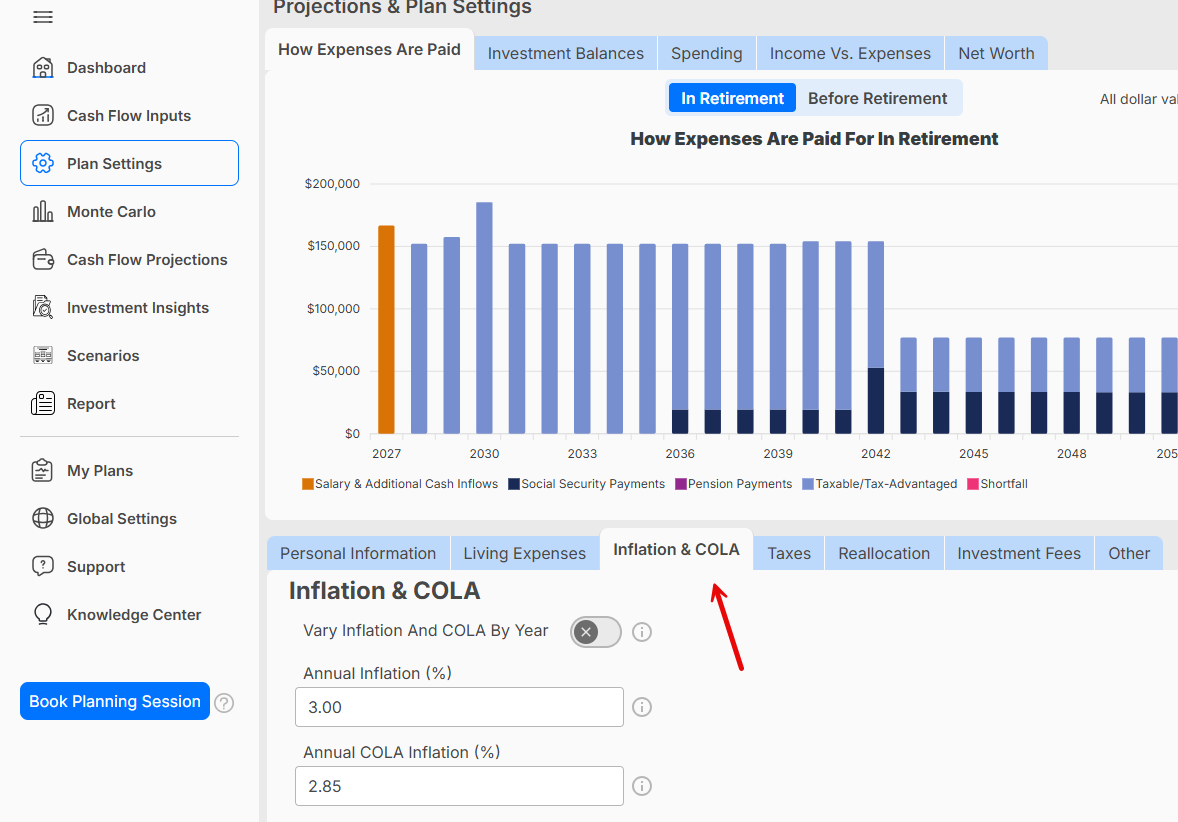
Where to Change Inflation and the COLA Rate
Where do I change the inflation rate used? What about COLA for Social Security?
You can review and update the inflation and cost-of-living adjustment (COLA) rates used in your WealthTrace plan from Plan Settings.
To change these rates:
- Click Plan Settings in the navigation menu.
- Select the Inflation & COLA tab.
- Enter the inflation rate you would like to use.
- Enter the COLA rate you would like to use.
- Save your changes.
The inflation rate is used to estimate how expenses and other inflation-adjusted values may increase over time. The COLA rate is used only to estimate future increases in Social Security benefits.
Updating these assumptions will affect the applicable projections throughout your plan. You can also select to vary inflation and COLA by year.